
You've seen the incredible images AI can create, from photorealistic portraits to sprawling fantasy landscapes. But when you try it yourself, the results can be underwhelming. The subject is right, but the style is off. The idea is there, but the composition is flat. The difference between a masterpiece and a mess often comes down to a single skill: prompt engineering.
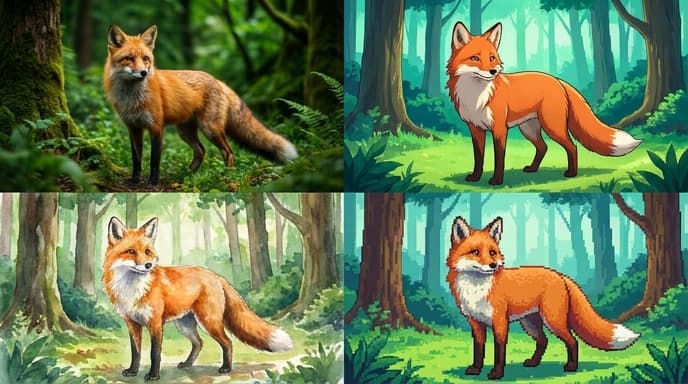
Crafting a good image prompt is an art form. It’s about giving the AI model a detailed, structured blueprint of the image you have in your mind. By learning to speak the model's language, you can take control of every element, from the artistic style down to the specific camera lens it should emulate.
The Basic Structure of a Great Prompt
While you can get interesting results with a simple phrase, high-quality images come from prompts that are layered with detail. A solid starting structure includes four key components:
- Subject: What is the main focus of the image? Be descriptive. Instead of
a dog, trya golden retriever puppy with floppy ears. - Style/Medium: What should it look like? Is it a photograph, a painting, a sculpture? What style? Instead of
a painting, tryan impressionist oil painting with thick, visible brushstrokes. - Context/Setting: Where and when is the subject? What is in the background? Instead of
in a forest, tryin a misty redwood forest at sunrise. - Framing/Composition: How is the subject framed? What kind of camera shot is it? Instead of just the subject, specify
a close-up portrait shot.
Putting it together: Close-up portrait shot of a golden retriever puppy with floppy ears, in a misty redwood forest at sunrise, impressionist oil painting with thick, visible brushstrokes.
Controlling Art Style and Medium
This is often the most impactful part of your prompt. Specifying a style or medium tells the model which artists, genres, and techniques to emulate. Mix and match to create unique effects.
- For artistic movements:
Impressionism,Surrealism,Cubism,Art Deco,Steampunk,Cyberpunk. - For mediums:
Oil painting,watercolor,charcoal sketch,woodblock print,linocut,3D render,pixel art. - For specific artist styles: You can reference the style of famous artists, for example,
in the style of Van Goghorin the style of Ansel Adams.
Example Prompt: A bustling city street in Tokyo, woodblock print, ukiyo-e style.
Directing the Lighting
Lighting determines the mood and drama of an image. Default lighting is often flat and uninteresting. Use specific keywords to create a more dynamic scene.
- For mood:
Soft lighting,dramatic lighting,cinematic lighting,moody lighting. - For time of day:
Golden hour,sunrise,midday,blue hour,dusk. - For light sources:
Volumetric lighting,neon glow,backlit,studio lighting,ring light.
Example Prompt: A lone astronaut standing on a desolate alien planet, dramatic cinematic lighting from a nearby nebula.
Mastering Composition and Camera Angles
Think like a photographer. Where is the camera? What lens is it using? Directing the composition gives you control over the story the image tells.
- For shot types:
Full-body shot,portrait,close-up,extreme close-up,macro shot. - For camera angles:
Low-angle shot,high-angle shot,bird's-eye view,Dutch angle. - For lenses:
Wide-angle lens,telephoto lens,fisheye lens,bokeh effect.
Example Prompt: A knight facing a dragon, epic low-angle shot from behind the knight, creating a sense of scale and danger, wide-angle lens.
Using Negative Prompts
Sometimes, telling the model what not to include is as important as telling it what to include. Most image generation tools have a specific parameter for negative prompts (e.g., --no in Midjourney).
- Common uses: Removing text, signatures, or watermarks (
--no text). Improving anatomy (--no extra limbs, distorted hands). Cleaning up the image (--no blurry, grainy, poorly drawn). - Stylistic uses: Removing colors or elements you dislike (
--no green,--no cars).
Example Prompt: Photorealistic portrait of a woman --no makeup, text, watermark.
FAQ
Why do my images have weird hands or extra fingers?
This is a common problem with many diffusion models. They understand the concept of 'hand' from millions of images but struggle with the precise anatomical structure. Using negative prompts like --no distorted hands, extra fingers, mutated hands can help.
How specific should I be?
Start with a medium level of detail and add more if the result isn't what you want. Overly long and complex prompts can sometimes confuse the model. It's a process of iteration.
Does the order of words in my prompt matter?
Yes. Most models give more weight to words at the beginning of the prompt. Place your most important concepts—usually the subject—first.
Key Takeaways
- Structure your prompts. Start with the subject, then add style, setting, and composition.
- Use specific keywords. Learn the language of art, photography, and film to direct the AI with precision.
- Control the light. Lighting is one of the most powerful tools for setting the mood of an image.
- Think like a director. Use camera angles and shot types to control the narrative and focus.
- Use negative prompts. Tell the AI what you want to avoid to clean up your results and refine your vision.
Related Reading
- How Diffusion Models Create Images From Noise: A Step-by-Step Guide
- What Are Text Embeddings? The Secret Behind AI's Understanding of Language
- How to Use Multimodal AI in Your Creative Workflow