
Plugging an external drive with old tax returns, accounting ledgers, or estate files into a computer immediately triggers hidden writes. Modern operating systems update access timestamps, index files for search, and build directory caches without asking. If background malware or ransomware is on the machine, those archive drives are exposed to tampering or encryption.
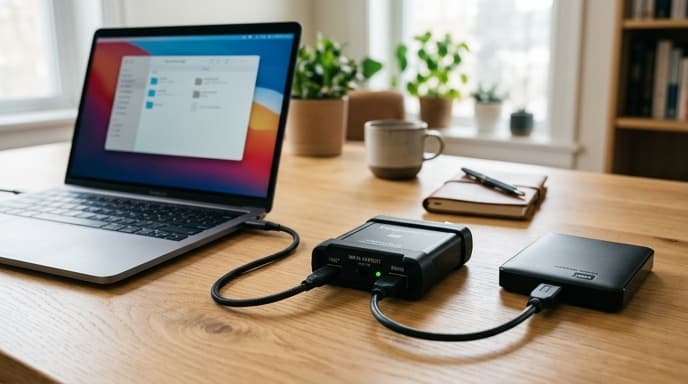
Using hardware write-blockers for financial records isolates the storage drive at the bus layer. Developed for forensic analysis and police work, these bridge devices keep stored records unchanged while you check old receipts, audit returns, or copy archives.
How Hardware Write-Blockers Function at the Physical Layer
A software read-only flag is just an operating system convention. Administrative scripts and buggy storage drivers can ignore logical flags and alter blocks. A physical forensic bridge, by contrast, intercepts commands on SATA, NVMe, or USB lines before they reach the drive's internal controller.
The bridge runs its own microcontroller firmware. When the host operating system sends SCSI or ATA packets, the bridge inspects the command opcode. Read commands pass straight through to the drive. Write commands, format operations, and disk geometry changes are dropped at the bridge, which returns a standard write-protect code to the host. The bits on the drive never receive an electrical signal to change.
Step-by-Step Setup for an Immutable Financial Archive Audit
Connecting a hardware write-blocker requires a specific order of operations to avoid line noise and handshake issues.
- Power down the storage media: Disconnect power from the archive drive (SATA HDD, SSD, or USB thumb drive) before connecting it to the bridge.
- Attach the bridge to the drive: Plug the drive into the "Read-Only" or "Evidence" port on the write-blocker.
- Power the bridge unit: If you are reading a 3.5-inch desktop drive, attach the bridge's external power supply so the bridge controller starts before communicating with the computer.
- Connect to the host workstation: Plug the USB cable from the bridge into your computer. Look for the physical write-block LED on the bridge to verify that write blocking is active.
- Perform your audit or duplication: Open bank statements, review spreadsheets, or generate raw disk images (.dd or .iso) without altering the source drive.
Hardware Write-Blocking vs. Software Read-Only Toggles
Operating system switches are easy to bypass. Mounting a drive as read-only in a terminal still leaves partition tables open to low-level disk utilities running with root privileges. The physical write-protect tabs on SD cards and some USB drives are no better; they rely on the card reader honoring the switch, and many budget card readers simply ignore it.
A hardware write-blocker uses an independent logic board that software on the host computer cannot override. If you need to open archive files on an everyday workstation, a physical blocker keeps the data intact.
FAQ
Can a hardware write-blocker be bypassed by sophisticated malware?
No. The bridge firmware does not pass write opcodes across the physical bus to the drive. The drive's write circuitry never receives instructions to modify storage cells or magnetic platters.
Do I need a write-blocker when saving new financial backups?
No. A write-blocker blocks all incoming data writes. Connect target drives directly to the computer when writing new backups, and use write-blockers only when inspecting or copying existing archives.
Can I run financial accounting software directly off a write-blocked drive?
Most accounting tools require write access to create lock files and temporary indexes. If the database is on a write-blocked drive, the program will typically throw an error or drop into a limited read-only mode. Copy the database to a local drive first before working with it.
Key Takeaways
- Operating systems write metadata and search indexes to connected storage drives without prompting.
- Hardware write-blockers inspect low-level commands, allowing reads and blocking writes at the firmware level.
- Physical forensic bridges protect against drive modifications more reliably than OS mount flags or SD card switches.
- Always connect the storage drive to the bridge before plugging the bridge into your computer.
Related Reading
- Air-Gapped Financial Backups: Comparing Encrypted USB vs Steel Seed Storage
- Hardware-Encrypted USB Drives: How to Pick Cold Storage for Financial Records
- Workstation Compartmentalization: Running Financial Accounts in Isolated Virtual Machines