
Plugging an external hard drive with old tax records or accounting files into a modern computer causes the operating system to write background data to the disk. Spotlight indexing, volume logs, and thumbnail caches modify file metadata automatically. Using hardware write-blockers for financial records prevents the host system from altering archived statements and ledgers.
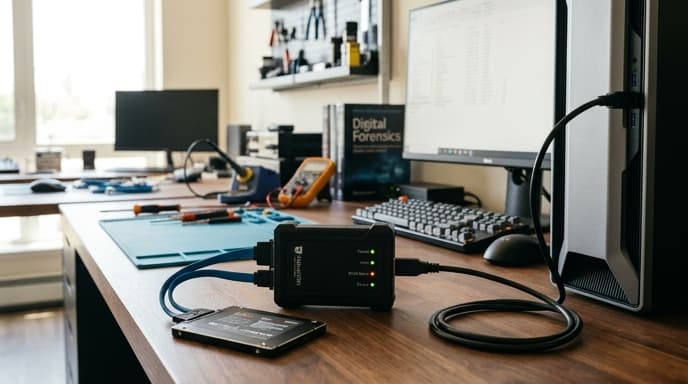
Commonly used in digital forensics and corporate investigations, a hardware write-blocker connects between storage media and a workstation. It intercepts every command, passing read requests while blocking write commands before they reach the drive controller.
The Problem of File System Contamination
Modern operating systems treat connected storage as live media. Simply mounting an external drive can cause the operating system to make silent changes:
- Metadata changes: Operating systems update "Last Accessed" timestamps across NTFS, APFS, or ext4 file systems automatically.
- Hidden system files: Desktops write hidden metadata caches, trash folders, and search indexes like
.DS_StoreorSystem Volume Informationdirectly to external volumes. - Malware transmission: If the workstation has active malware or ransomware, it can encrypt or infect an unprotected drive as soon as it mounts.
Hardware vs. Software Write-Blocking
Software registry flags and terminal commands can mount drives in read-only mode, but they depend on the operating system kernel handling the request properly. A driver crash, system glitch, or privilege escalation bug can bypass those settings.
A hardware write-blocker controls data direction at the physical circuit level. The host computer talks directly to the blocker's firmware, which reports the connected storage as a read-only device. If software sends low-level write commands like SCSI WRITE or ATA WRITE SECTOR, the hardware bridge rejects the command before it reaches the drive's pins.
Setting Up an Immutable Archive Inspection Station
Follow a consistent hardware setup routine when reviewing permanent financial archives:
- Source media verification: Turn off the storage drive, whether it is an internal SATA SSD, an NVMe enclosure, or an external hard drive.
- Bridge connection: Connect the drive to the "Source" port on the write-blocker.
- Host interface attachment: Connect the blocker's "Host" port to your workstation using a USB-C or Thunderbolt cable.
- Confirm write-blocking state: Check that the "Read Only" or "Block" LED is illuminated on the unit before mounting the drive in your OS.
- Generate a baseline hash: Calculate a SHA-256 hash of the archive before and after access. Identical hashes prove the files were not modified during your review.
FAQ
Does a write-blocker prevent hardware drive failure?
No. Write-blockers prevent file changes, accidental deletions, and metadata writes. They cannot protect against physical wear, degraded flash cells, or magnetic decay.
Can I format a drive through a hardware write-blocker by accident?
No. Partitioning, formatting, and file-deletion commands fail because the bridge blocks all write requests before they reach the disk.
Are forensic write-blockers required for personal tax audits?
No law requires write-blockers for individual audits. However, they provide verifiable proof that records were not altered for corporate compliance or legal reviews.
Key Takeaways
- Hardware write-blockers prevent operating systems from altering file timestamps and metadata on archived records.
- Operating systems write temporary index files and folder caches to unprotected drives as soon as they mount.
- Hardware blockers enforce read-only policies at the circuit board level, bypassing software bugs.
- Comparing SHA-256 hashes before and after an audit verifies that data remained untouched.
- Write-blockers are valuable for archiving corporate ledgers, tax histories, and legal records.
Related Reading
- Air-Gapped Financial Backups: Comparing Encrypted USB vs Steel Seed Storage
- Hardware-Encrypted USB Drives: How to Pick Cold Storage for Financial Records
- Dedicated Document Scanners for Tax Records: Key Specs to Look For